Introduction
This blogpost shows some useful configurations for the Mikrotik hAP ac² Wi-Fi router 1. These profiles I used for testing purposes are different combinations between switching only, NAT routing, Wi-Fi and LTE by connecting a phone via USB.
Product Information
The Mikrotik hAP ac² router has 5 Gigabit Ethernet ports, one with PoE, Wi-Fi and USB for 3G/4G support.
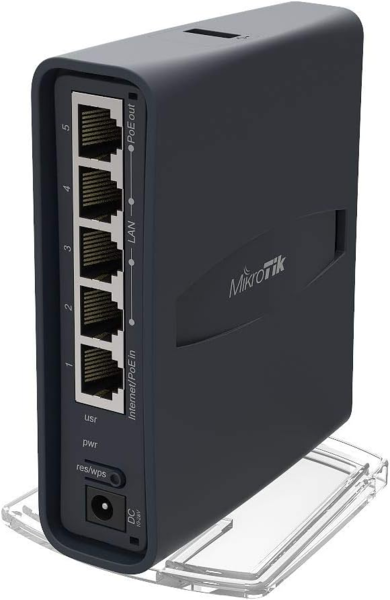
Technical details 2:
| Description | Configuration |
|---|---|
| Product Name | Mikrotik hAP ac² |
| Product Page | https://mikrotik.com/product/hap_ac2 |
| Architecture | 32 bit ARM |
| OS | RouterOS (https://wiki.mikrotik.com/wiki/Manual:TOC) |
| RAM | 128 MB |
| Storage | 16 MB Flash |
| Ethernet | 5 x 10/100/1000 Mbps ports |
| Wireless | 2.4 GHz (300 Mbps), 802.11b/g/n 5 GHz (867 Mbps), 802.11a/n/ac |
| USB | 1 port, can be used for tethering |
| Power | 12-28 V input, max. 21 W |
Usage
Reset
Reset the RouterOS configuration:
- Unplug the device from power
- Press and hold the button right after applying power
- Hold the button until LED will start flashing
- Release the button to clear configuration
Connect
Connect your Ethernet port (e.g. eth0) to the port 2 of the router.
Get a network configuration either via your network management software or manually:
$ sudo ip link set dev eth0 up
$ sudo dhclient -v eth0
Upload Profile
Take the profile you want, modify it to your needs (IP addresses, credentials, Wi-Fi name, …).
⚠️ Always make sure to change the credentials for the Wi-Fi and management interface!
Upload the profile to the router via FTP:
$ curl -T wifi-nat-router ftp://admin:@192.168.88.1/flash/myconfig.rsc
  % Total    % Received % Xferd  Average Speed   Time    Time     Time  Current
                                 Dload  Upload   Total   Spent    Left  Speed
100  5376    0     0  100  5376      0  86709 --:--:-- --:--:-- --:--:-- 88131
Apply Profile
Connect to the router on 192.168.88.1 and login using the default credentials
(username admin / empty password):
$ telnet 192.168.88.1
Trying 192.168.88.1...
Connected to 192.168.88.1.
Escape character is '^]'.

MikroTik v6.45.8 (long-term)
Login: admin
Password:

[...]
Perform a reset and apply the configuration:
[admin@MikroTik] > /system reset-configuration run-after-reset=flash/myconfig.rsc
Dangerous! Reset anyway? [y/N]:
y
system configuration will be reset
Connection closed by foreign host.
The router will reboot and the configuration will be applied. Enjoy.
Profiles
The profiles are available on GitHub 3 and are also linked and included below.
Ethernet Switch
A simple Ethernet switch.
| Description | Configuration |
|---|---|
| Profile Name | ethernet-switch |
| File | ethernet-switch |
| Hostname | myrouter |
| Management | 10.5.23.1/24 on all ports |
| Credentials | admin:password |
| Mode | Bridge |
| Wireless | Disabled |
| Local Network (all ports) | Switching |
Show Profile
:delay 15s
/user set 0 password="password"

/interface bridge add admin-mac=48:8F:5A:7B:CA:DD auto-mac=no comment=defconf name=bridge
/interface wireless set [ find default-name=wlan1 ] band=2ghz-b/g/n channel-width=20/40mhz-XX disabled=yes distance=indoors frequency=auto installation=indoor mode=ap-bridge ssid=mywifi wireless-protocol=802.11
/interface wireless set [ find default-name=wlan2 ] band=5ghz-a/n/ac channel-width=20/40/80mhz-XXXX disabled=yes distance=indoors frequency=auto installation=indoor mode=ap-bridge ssid=mywifi wireless-protocol=802.11
/interface list add comment=defconf name=WAN
/interface list add comment=defconf name=LAN
/interface wireless security-profiles set [ find default=yes ] authentication-types=wpa2-psk mode=dynamic-keys supplicant-identity=MikroTik wpa-pre-shared-key=wifipassword wpa2-pre-shared-key=wifipassword
/ip hotspot profile set [ find default=yes ] html-directory=flash/hotspot
/ip pool add name=dhcp ranges=10.5.23.50-10.5.23.100
/ip dhcp-server add address-pool=dhcp interface=bridge name=defconf
/interface bridge port add bridge=bridge comment=defconf interface=ether1
/interface bridge port add bridge=bridge comment=defconf interface=ether2
/interface bridge port add bridge=bridge comment=defconf interface=ether3
/interface bridge port add bridge=bridge comment=defconf interface=ether4
/interface bridge port add bridge=bridge comment=defconf interface=ether5
/interface bridge port add bridge=bridge comment=defconf interface=wlan1
/interface bridge port add bridge=bridge comment=defconf interface=wlan2
/interface list member add comment=defconf interface=ether1 list=WAN
/interface list member add interface=ether2 list=LAN
/interface list member add interface=ether3 list=LAN
/interface list member add interface=ether4 list=LAN
/interface list member add interface=ether5 list=LAN
/interface list member add interface=wlan2 list=LAN
/interface list member add interface=wlan1 list=LAN
/ip address add address=10.5.23.1/24 comment=defconf interface=ether2 network=10.5.23.0
/ip address add address=10.5.23.1/8 disabled=yes interface=ether1 network=10.0.0.0
/ip dhcp-client add comment=defconf dhcp-options=hostname,clientid interface=bridge
/ip dhcp-server network add address=10.5.42.0/24 comment=defconf gateway=10.5.42.1 netmask=24
/ip dns set allow-remote-requests=yes
/ip dns static add address=10.5.23.1 comment=defconf name=router.lan
/ip firewall filter add action=accept chain=forward comment="defconf: accept in ipsec policy" ipsec-policy=in,ipsec
/ip firewall filter add action=accept chain=forward comment="defconf: accept out ipsec policy" ipsec-policy=out,ipsec
/ip firewall filter add action=fasttrack-connection chain=forward comment="defconf: fasttrack" connection-state=established,related
/ip firewall filter add action=accept chain=forward comment="defconf: accept established,related, untracked" connection-state=established,related,untracked
/ip firewall filter add action=drop chain=forward comment="defconf: drop invalid" connection-state=invalid
/ip firewall filter add action=drop chain=forward comment="defconf: drop all from WAN not DSTNATed" connection-nat-state=!dstnat connection-state=new in-interface-list=WAN
/ip firewall filter add action=accept chain=forward comment="defconf: accept in ipsec policy" ipsec-policy=in,ipsec
/ip firewall filter add action=accept chain=forward comment="defconf: accept out ipsec policy" ipsec-policy=out,ipsec
/ip firewall filter add action=fasttrack-connection chain=forward comment="defconf: fasttrack" connection-state=established,related
/ip firewall filter add action=accept chain=forward comment="defconf: accept established,related, untracked" connection-state=established,related,untracked
/ip firewall filter add action=drop chain=forward comment="defconf: drop invalid" connection-state=invalid
/ip firewall filter add action=drop chain=forward comment="defconf: drop all from WAN not DSTNATed" connection-nat-state=!dstnat connection-state=new in-interface-list=WAN
/ip firewall nat add action=masquerade chain=srcnat comment="defconf: masquerade" ipsec-policy=out,none out-interface-list=WAN
/ip firewall nat add action=masquerade chain=srcnat comment="defconf: masquerade" disabled=yes ipsec-policy=out,none out-interface-list=WAN
/ip route add distance=1 gateway=10.5.23.1
/system identity set name=myrouter
WiFi Ethernet Switch
A simple Ethernet switch and also a Wi-Fi access point to access the same network.
| Description | Configuration |
|---|---|
| Profile Name | wifi-ethernet-switch |
| File | wifi-ethernet-switch |
| Hostname | myrouter |
| Management | 10.5.23.1/24 on all ports and Wi-Fi |
| Credentials | admin:password |
| Mode | Bridge |
| Wireless | Enabled |
| SSID | mywifi |
| Wi-Fi Password | wifipassword |
| Wi-Fi Security | WPA2, AES/CCM |
| Local Network (all ports) | Switching |
Show Profile
:delay 15s
/user set 0 password="password"

/interface bridge add admin-mac=48:8F:5A:7B:CA:DD auto-mac=no comment=defconf name=bridge
/interface wireless set [ find default-name=wlan1 ] band=2ghz-b/g/n channel-width=20/40mhz-XX disabled=no distance=indoors frequency=auto installation=indoor mode=ap-bridge ssid=mywifi wireless-protocol=802.11
/interface wireless set [ find default-name=wlan2 ] band=5ghz-a/n/ac channel-width=20/40/80mhz-XXXX disabled=no distance=indoors frequency=auto installation=indoor mode=ap-bridge ssid=mywifi wireless-protocol=802.11
/interface list add comment=defconf name=WAN
/interface list add comment=defconf name=LAN
/interface wireless security-profiles set [ find default=yes ] authentication-types=wpa2-psk mode=dynamic-keys supplicant-identity=MikroTik wpa-pre-shared-key=wifipassword wpa2-pre-shared-key=wifipassword
/ip hotspot profile set [ find default=yes ] html-directory=flash/hotspot
/ip pool add name=dhcp ranges=10.5.23.50-10.5.23.100
/ip dhcp-server add address-pool=dhcp interface=bridge name=defconf
/interface bridge port add bridge=bridge comment=defconf interface=ether1
/interface bridge port add bridge=bridge comment=defconf interface=ether2
/interface bridge port add bridge=bridge comment=defconf interface=ether3
/interface bridge port add bridge=bridge comment=defconf interface=ether4
/interface bridge port add bridge=bridge comment=defconf interface=ether5
/interface bridge port add bridge=bridge comment=defconf interface=wlan1
/interface bridge port add bridge=bridge comment=defconf interface=wlan2
/interface list member add comment=defconf interface=ether1 list=WAN
/interface list member add interface=ether2 list=LAN
/interface list member add interface=ether3 list=LAN
/interface list member add interface=ether4 list=LAN
/interface list member add interface=ether5 list=LAN
/interface list member add interface=wlan2 list=LAN
/interface list member add interface=wlan1 list=LAN
/ip address add address=10.5.23.1/24 comment=defconf interface=ether2 network=10.5.23.0
/ip address add address=10.5.23.1/8 disabled=yes interface=ether1 network=10.0.0.0
/ip dhcp-client add comment=defconf dhcp-options=hostname,clientid interface=bridge
/ip dhcp-server network add address=10.5.42.0/24 comment=defconf gateway=10.5.42.1 netmask=24
/ip dns set allow-remote-requests=yes
/ip dns static add address=10.5.23.1 comment=defconf name=router.lan
/ip firewall filter add action=accept chain=forward comment="defconf: accept in ipsec policy" ipsec-policy=in,ipsec
/ip firewall filter add action=accept chain=forward comment="defconf: accept out ipsec policy" ipsec-policy=out,ipsec
/ip firewall filter add action=fasttrack-connection chain=forward comment="defconf: fasttrack" connection-state=established,related
/ip firewall filter add action=accept chain=forward comment="defconf: accept established,related, untracked" connection-state=established,related,untracked
/ip firewall filter add action=drop chain=forward comment="defconf: drop invalid" connection-state=invalid
/ip firewall filter add action=drop chain=forward comment="defconf: drop all from WAN not DSTNATed" connection-nat-state=!dstnat connection-state=new in-interface-list=WAN
/ip firewall filter add action=accept chain=forward comment="defconf: accept in ipsec policy" ipsec-policy=in,ipsec
/ip firewall filter add action=accept chain=forward comment="defconf: accept out ipsec policy" ipsec-policy=out,ipsec
/ip firewall filter add action=fasttrack-connection chain=forward comment="defconf: fasttrack" connection-state=established,related
/ip firewall filter add action=accept chain=forward comment="defconf: accept established,related, untracked" connection-state=established,related,untracked
/ip firewall filter add action=drop chain=forward comment="defconf: drop invalid" connection-state=invalid
/ip firewall filter add action=drop chain=forward comment="defconf: drop all from WAN not DSTNATed" connection-nat-state=!dstnat connection-state=new in-interface-list=WAN
/ip firewall nat add action=masquerade chain=srcnat comment="defconf: masquerade" ipsec-policy=out,none out-interface-list=WAN
/ip firewall nat add action=masquerade chain=srcnat comment="defconf: masquerade" disabled=yes ipsec-policy=out,none out-interface-list=WAN
/ip route add distance=1 gateway=10.5.23.1
/system identity set name=myrouter
NAT Router
A router with one WAN port for the uplink and the other ports for the clients.
| Description | Configuration |
|---|---|
| Profile Name | nat-router |
| File | nat-router |
| Hostname | myrouter |
| Management | 10.5.23.1/24 on ports 2-5 |
| Credentials | admin:password |
| Mode | Router |
| Wireless | Disabled |
WAN/Uplink (port 1) |
DHCP client for uplink connection, MAC Address: 48:8F:5A:11:22:33 |
Local Network (port 2-5) |
DHCP server for client connections, Pool: 10.5.23.50-100 |
Show Profile
:delay 15s
/user set 0 password="password"

/interface bridge add admin-mac=48:8F:5A:7B:CA:DD auto-mac=no comment=defconf name=bridge
/interface ethernet set [ find default-name=ether1 ] mac-address=48:8F:5A:11:22:33
/interface wireless set [ find default-name=wlan1 ] band=2ghz-b/g/n channel-width=20/40mhz-XX disabled=yes distance=indoors frequency=auto installation=indoor mode=ap-bridge ssid=mywifi wireless-protocol=802.11
/interface wireless set [ find default-name=wlan2 ] band=5ghz-a/n/ac channel-width=20/40/80mhz-XXXX disabled=yes distance=indoors frequency=auto installation=indoor mode=ap-bridge ssid=mywifi wireless-protocol=802.11
/interface list add comment=defconf name=WAN
/interface list add comment=defconf name=LAN
/interface wireless security-profiles set [ find default=yes ] authentication-types=wpa2-psk mode=dynamic-keys supplicant-identity=MikroTik wpa-pre-shared-key=wifipassword wpa2-pre-shared-key=wifipassword
/ip hotspot profile set [ find default=yes ] html-directory=flash/hotspot
/ip pool add name=dhcp ranges=10.5.23.50-10.5.23.100
/ip dhcp-server add address-pool=dhcp disabled=no interface=bridge name=defconf
/interface bridge port add bridge=bridge comment=defconf interface=ether2
/interface bridge port add bridge=bridge comment=defconf interface=ether3
/interface bridge port add bridge=bridge comment=defconf interface=ether4
/interface bridge port add bridge=bridge comment=defconf interface=ether5
/interface bridge port add bridge=bridge comment=defconf interface=wlan1
/interface bridge port add bridge=bridge comment=defconf interface=wlan2
/ip neighbor discovery-settings set discover-interface-list=LAN
/interface list member add comment=defconf interface=bridge list=LAN
/interface list member add comment=defconf interface=ether1 list=WAN
/ip address add address=10.5.23.1/24 comment=defconf interface=ether2 network=10.5.23.0
/ip dhcp-client add comment=defconf dhcp-options=hostname,clientid disabled=no interface=ether1
/ip dhcp-server network add address=10.5.23.0/24 comment=defconf gateway=10.5.23.1 netmask=24
/ip dns set allow-remote-requests=yes
/ip dns static add address=10.5.23.1 comment=defconf name=router.lan
/ip firewall filter add action=accept chain=input comment="defconf: accept established,related,untracked" connection-state=established,related,untracked
/ip firewall filter add action=drop chain=input comment="defconf: drop invalid" connection-state=invalid
/ip firewall filter add action=accept chain=input comment="defconf: accept ICMP" protocol=icmp
/ip firewall filter add action=accept chain=input comment="defconf: accept to local loopback (for CAPsMAN)" dst-address=127.0.0.1
/ip firewall filter add action=drop chain=input comment="defconf: drop all not coming from LAN" in-interface-list=!LAN
/ip firewall filter add action=accept chain=forward comment="defconf: accept in ipsec policy" ipsec-policy=in,ipsec
/ip firewall filter add action=accept chain=forward comment="defconf: accept out ipsec policy" ipsec-policy=out,ipsec
/ip firewall filter add action=fasttrack-connection chain=forward comment="defconf: fasttrack" connection-state=established,related
/ip firewall filter add action=accept chain=forward comment="defconf: accept established,related, untracked" connection-state=established,related,untracked
/ip firewall filter add action=drop chain=forward comment="defconf: drop invalid" connection-state=invalid
/ip firewall filter add action=drop chain=forward comment="defconf: drop all from WAN not DSTNATed" connection-nat-state=!dstnat connection-state=new in-interface-list=WAN
/ip firewall filter add action=accept chain=input comment="defconf: accept established,related,untracked" connection-state=established,related,untracked
/ip firewall filter add action=drop chain=input comment="defconf: drop invalid" connection-state=invalid
/ip firewall filter add action=accept chain=input comment="defconf: accept ICMP" protocol=icmp
/ip firewall filter add action=accept chain=input comment="defconf: accept to local loopback (for CAPsMAN)" dst-address=127.0.0.1
/ip firewall filter add action=drop chain=input comment="defconf: drop all not coming from LAN" in-interface-list=!LAN
/ip firewall filter add action=accept chain=forward comment="defconf: accept in ipsec policy" ipsec-policy=in,ipsec
/ip firewall filter add action=accept chain=forward comment="defconf: accept out ipsec policy" ipsec-policy=out,ipsec
/ip firewall filter add action=fasttrack-connection chain=forward comment="defconf: fasttrack" connection-state=established,related
/ip firewall filter add action=accept chain=forward comment="defconf: accept established,related, untracked" connection-state=established,related,untracked
/ip firewall filter add action=drop chain=forward comment="defconf: drop invalid" connection-state=invalid
/ip firewall filter add action=drop chain=forward comment="defconf: drop all from WAN not DSTNATed" connection-nat-state=!dstnat connection-state=new in-interface-list=WAN
/ip firewall nat add action=masquerade chain=srcnat comment="defconf: masquerade" ipsec-policy=out,none out-interface-list=WAN
/ip firewall nat add action=masquerade chain=srcnat comment="defconf: masquerade" ipsec-policy=out,none out-interface-list=WAN
/system identity set name=myrouter
/tool mac-server set allowed-interface-list=LAN
/tool mac-server mac-winbox set allowed-interface-list=LAN
WiFi NAT Router
A router with one WAN port for the uplink and the other ports and Wi-Fi for the clients.
| Description | Configuration |
|---|---|
| Profile Name | wifi-nat-router |
| File | wifi-nat-router |
| Hostname | myrouter |
| Management | 10.5.23.1/24 on ports 2-5 |
| Credentials | admin:password |
| Mode | Router |
| Wireless | Enabled |
| SSID | mywifi |
| Wi-Fi Password | wifipassword |
| Wi-Fi Security | WPA2, AES/CCM |
WAN/Uplink (port 1) |
DHCP client for uplink connection, MAC Address: 48:8F:5A:11:22:33 |
Local Network (port 2-5 and Wi-Fi) |
DHCP server for client connections, Pool: 10.5.23.50-100 |
Show Profile
:delay 15s
/user set 0 password="password"

/interface bridge add admin-mac=48:8F:5A:7B:CA:DD auto-mac=no comment=defconf name=bridge
/interface ethernet set [ find default-name=ether1 ] mac-address=48:8F:5A:11:22:33
/interface wireless set [ find default-name=wlan1 ] band=2ghz-b/g/n channel-width=20/40mhz-XX disabled=no distance=indoors frequency=auto installation=indoor mode=ap-bridge ssid=mywifi wireless-protocol=802.11
/interface wireless set [ find default-name=wlan2 ] band=5ghz-a/n/ac channel-width=20/40/80mhz-XXXX disabled=no distance=indoors frequency=auto installation=indoor mode=ap-bridge ssid=mywifi wireless-protocol=802.11
/interface list add comment=defconf name=WAN
/interface list add comment=defconf name=LAN
/interface wireless security-profiles set [ find default=yes ] authentication-types=wpa2-psk mode=dynamic-keys supplicant-identity=MikroTik wpa-pre-shared-key=wifipassword wpa2-pre-shared-key=wifipassword
/ip hotspot profile set [ find default=yes ] html-directory=flash/hotspot
/ip pool add name=dhcp ranges=10.5.23.50-10.5.23.100
/ip dhcp-server add address-pool=dhcp disabled=no interface=bridge name=defconf
/interface bridge port add bridge=bridge comment=defconf interface=ether2
/interface bridge port add bridge=bridge comment=defconf interface=ether3
/interface bridge port add bridge=bridge comment=defconf interface=ether4
/interface bridge port add bridge=bridge comment=defconf interface=ether5
/interface bridge port add bridge=bridge comment=defconf interface=wlan1
/interface bridge port add bridge=bridge comment=defconf interface=wlan2
/ip neighbor discovery-settings set discover-interface-list=LAN
/interface list member add comment=defconf interface=bridge list=LAN
/interface list member add comment=defconf interface=ether1 list=WAN
/ip address add address=10.5.23.1/24 comment=defconf interface=ether2 network=10.5.23.0
/ip dhcp-client add comment=defconf dhcp-options=hostname,clientid disabled=no interface=ether1
/ip dhcp-server network add address=10.5.23.0/24 comment=defconf gateway=10.5.23.1 netmask=24
/ip dns set allow-remote-requests=yes
/ip dns static add address=10.5.23.1 comment=defconf name=router.lan
/ip firewall filter add action=accept chain=input comment="defconf: accept established,related,untracked" connection-state=established,related,untracked
/ip firewall filter add action=drop chain=input comment="defconf: drop invalid" connection-state=invalid
/ip firewall filter add action=accept chain=input comment="defconf: accept ICMP" protocol=icmp
/ip firewall filter add action=accept chain=input comment="defconf: accept to local loopback (for CAPsMAN)" dst-address=127.0.0.1
/ip firewall filter add action=drop chain=input comment="defconf: drop all not coming from LAN" in-interface-list=!LAN
/ip firewall filter add action=accept chain=forward comment="defconf: accept in ipsec policy" ipsec-policy=in,ipsec
/ip firewall filter add action=accept chain=forward comment="defconf: accept out ipsec policy" ipsec-policy=out,ipsec
/ip firewall filter add action=fasttrack-connection chain=forward comment="defconf: fasttrack" connection-state=established,related
/ip firewall filter add action=accept chain=forward comment="defconf: accept established,related, untracked" connection-state=established,related,untracked
/ip firewall filter add action=drop chain=forward comment="defconf: drop invalid" connection-state=invalid
/ip firewall filter add action=drop chain=forward comment="defconf: drop all from WAN not DSTNATed" connection-nat-state=!dstnat connection-state=new in-interface-list=WAN
/ip firewall filter add action=accept chain=input comment="defconf: accept established,related,untracked" connection-state=established,related,untracked
/ip firewall filter add action=drop chain=input comment="defconf: drop invalid" connection-state=invalid
/ip firewall filter add action=accept chain=input comment="defconf: accept ICMP" protocol=icmp
/ip firewall filter add action=accept chain=input comment="defconf: accept to local loopback (for CAPsMAN)" dst-address=127.0.0.1
/ip firewall filter add action=drop chain=input comment="defconf: drop all not coming from LAN" in-interface-list=!LAN
/ip firewall filter add action=accept chain=forward comment="defconf: accept in ipsec policy" ipsec-policy=in,ipsec
/ip firewall filter add action=accept chain=forward comment="defconf: accept out ipsec policy" ipsec-policy=out,ipsec
/ip firewall filter add action=fasttrack-connection chain=forward comment="defconf: fasttrack" connection-state=established,related
/ip firewall filter add action=accept chain=forward comment="defconf: accept established,related, untracked" connection-state=established,related,untracked
/ip firewall filter add action=drop chain=forward comment="defconf: drop invalid" connection-state=invalid
/ip firewall filter add action=drop chain=forward comment="defconf: drop all from WAN not DSTNATed" connection-nat-state=!dstnat connection-state=new in-interface-list=WAN
/ip firewall nat add action=masquerade chain=srcnat comment="defconf: masquerade" ipsec-policy=out,none out-interface-list=WAN
/ip firewall nat add action=masquerade chain=srcnat comment="defconf: masquerade" ipsec-policy=out,none out-interface-list=WAN
/system identity set name=myrouter
/tool mac-server set allowed-interface-list=LAN
/tool mac-server mac-winbox set allowed-interface-list=LAN
LTE NAT Router
A router using the mobile phone connected via USB for the uplink and the ethernet ports for the clients.
| Description | Configuration |
|---|---|
| Profile Name | lte-nat-router |
| File | lte-nat-router |
| Hostname | myrouter |
| Management | 10.5.23.1/24 on all ports |
| Credentials | admin:password |
| Mode | Router |
| USB | Connect mobile phone via USB. Router performs DHCP. |
| Wireless | Disabled |
| Local Network (all ports) | DHCP server for clients, Pool: 10.5.23.50-100 |
Show Profile
:delay 15s
/user set 0 password="password"

/interface bridge add admin-mac=48:8F:5A:7B:CA:DD auto-mac=no comment=defconf name=bridge
/interface lte set [ find ] mac-address=4E:9D:FE:AF:BA:5B name=lte1
/interface wireless set [ find default-name=wlan1 ] band=2ghz-b/g/n channel-width=20/40mhz-XX disabled=yes distance=indoors frequency=auto installation=indoor mode=ap-bridge ssid=mywifi wireless-protocol=802.11
/interface wireless set [ find default-name=wlan2 ] band=5ghz-a/n/ac channel-width=20/40/80mhz-XXXX disabled=yes distance=indoors frequency=auto installation=indoor mode=ap-bridge ssid=mywifi wireless-protocol=802.11
/interface list add comment=defconf name=WAN
/interface list add comment=defconf name=LAN
/interface wireless security-profiles set [ find default=yes ] authentication-types=wpa2-psk mode=dynamic-keys supplicant-identity=MikroTik wpa-pre-shared-key=wifipassword wpa2-pre-shared-key=wifipassword
/ip hotspot profile set [ find default=yes ] html-directory=flash/hotspot
/ip pool add name=dhcp ranges=10.5.23.50-10.5.23.100
/ip dhcp-server add address-pool=dhcp disabled=no interface=bridge name=defconf
/interface bridge port add bridge=bridge comment=defconf interface=ether1
/interface bridge port add bridge=bridge comment=defconf interface=ether2
/interface bridge port add bridge=bridge comment=defconf interface=ether3
/interface bridge port add bridge=bridge comment=defconf interface=ether4
/interface bridge port add bridge=bridge comment=defconf interface=ether5
/interface bridge port add bridge=bridge comment=defconf interface=wlan1
/interface bridge port add bridge=bridge comment=defconf interface=wlan2
/ip neighbor discovery-settings set discover-interface-list=LAN
/interface list member add comment=defconf interface=bridge list=LAN
/interface list member add comment=defconf interface=lte1 list=WAN
/ip address add address=10.5.23.1/24 comment=defconf interface=ether2 network=10.5.23.0
/ip dhcp-server network add address=10.5.23.0/24 comment=defconf gateway=10.5.23.1 netmask=24
/ip dns set allow-remote-requests=yes
/ip dns static add address=10.5.23.1 comment=defconf name=router.lan
/ip firewall filter add action=accept chain=input comment="defconf: accept established,related,untracked" connection-state=established,related,untracked
/ip firewall filter add action=drop chain=input comment="defconf: drop invalid" connection-state=invalid
/ip firewall filter add action=accept chain=input comment="defconf: accept ICMP" protocol=icmp
/ip firewall filter add action=accept chain=input comment="defconf: accept to local loopback (for CAPsMAN)" dst-address=127.0.0.1
/ip firewall filter add action=drop chain=input comment="defconf: drop all not coming from LAN" in-interface-list=!LAN
/ip firewall filter add action=accept chain=forward comment="defconf: accept in ipsec policy" ipsec-policy=in,ipsec
/ip firewall filter add action=accept chain=forward comment="defconf: accept out ipsec policy" ipsec-policy=out,ipsec
/ip firewall filter add action=fasttrack-connection chain=forward comment="defconf: fasttrack" connection-state=established,related
/ip firewall filter add action=accept chain=forward comment="defconf: accept established,related, untracked" connection-state=established,related,untracked
/ip firewall filter add action=drop chain=forward comment="defconf: drop invalid" connection-state=invalid
/ip firewall filter add action=drop chain=forward comment="defconf: drop all from WAN not DSTNATed" connection-nat-state=!dstnat connection-state=new in-interface-list=WAN
/ip firewall filter add action=accept chain=input comment="defconf: accept established,related,untracked" connection-state=established,related,untracked
/ip firewall filter add action=drop chain=input comment="defconf: drop invalid" connection-state=invalid
/ip firewall filter add action=accept chain=input comment="defconf: accept ICMP" protocol=icmp
/ip firewall filter add action=accept chain=input comment="defconf: accept to local loopback (for CAPsMAN)" dst-address=127.0.0.1
/ip firewall filter add action=drop chain=input comment="defconf: drop all not coming from LAN" in-interface-list=!LAN
/ip firewall filter add action=accept chain=forward comment="defconf: accept in ipsec policy" ipsec-policy=in,ipsec
/ip firewall filter add action=accept chain=forward comment="defconf: accept out ipsec policy" ipsec-policy=out,ipsec
/ip firewall filter add action=fasttrack-connection chain=forward comment="defconf: fasttrack" connection-state=established,related
/ip firewall filter add action=accept chain=forward comment="defconf: accept established,related, untracked" connection-state=established,related,untracked
/ip firewall filter add action=drop chain=forward comment="defconf: drop invalid" connection-state=invalid
/ip firewall filter add action=drop chain=forward comment="defconf: drop all from WAN not DSTNATed" connection-nat-state=!dstnat connection-state=new in-interface-list=WAN
/ip firewall nat add action=masquerade chain=srcnat comment="defconf: masquerade" ipsec-policy=out,none out-interface-list=WAN
/ip firewall nat add action=masquerade chain=srcnat comment="defconf: masquerade" ipsec-policy=out,none out-interface-list=WAN
/system clock set time-zone-name=Europe/Zurich
/system identity set name=myrouter
/tool mac-server set allowed-interface-list=LAN
/tool mac-server mac-winbox set allowed-interface-list=LAN
LTE WiFi NAT Router
A router using the mobile phone connected via USB for the uplink and the ethernet ports and Wi-Fi for the clients.
| Description | Configuration |
|---|---|
| Profile Name | lte-wifi-nat-router |
| File | lte-wifi-nat-router |
| Hostname | myrouter |
| Management | 10.5.23.1/24 on all ports |
| Credentials | admin:password |
| Mode | Router |
| USB | Connect mobile phone via USB. Router performs DHCP. |
| Wireless | Enabled |
| SSID | mywifi |
| Wi-Fi Password | wifipassword |
| Wi-Fi Security | WPA2, AES/CCM |
| Local Network (all ports) | DHCP server for clients, Pool: 10.5.23.50-100 |
Show Profile
:delay 15s
/user set 0 password="password"

/interface bridge add admin-mac=48:8F:5A:7B:CA:DD auto-mac=no comment=defconf name=bridge
/interface lte set [ find ] mac-address=4E:9D:FE:AF:BA:5B name=lte1
/interface wireless set [ find default-name=wlan1 ] band=2ghz-b/g/n channel-width=20/40mhz-XX disabled=yes distance=indoors frequency=auto installation=indoor mode=ap-bridge ssid=mywifi wireless-protocol=802.11
/interface wireless set [ find default-name=wlan2 ] band=5ghz-a/n/ac channel-width=20/40/80mhz-XXXX disabled=yes distance=indoors frequency=auto installation=indoor mode=ap-bridge ssid=mywifi wireless-protocol=802.11
/interface list add comment=defconf name=WAN
/interface list add comment=defconf name=LAN
/interface wireless security-profiles set [ find default=yes ] authentication-types=wpa2-psk mode=dynamic-keys supplicant-identity=MikroTik wpa-pre-shared-key=wifipassword wpa2-pre-shared-key=wifipassword
/ip hotspot profile set [ find default=yes ] html-directory=flash/hotspot
/ip pool add name=dhcp ranges=10.5.23.50-10.5.23.100
/ip dhcp-server add address-pool=dhcp disabled=no interface=bridge name=defconf
/interface bridge port add bridge=bridge comment=defconf interface=ether1
/interface bridge port add bridge=bridge comment=defconf interface=ether2
/interface bridge port add bridge=bridge comment=defconf interface=ether3
/interface bridge port add bridge=bridge comment=defconf interface=ether4
/interface bridge port add bridge=bridge comment=defconf interface=ether5
/interface bridge port add bridge=bridge comment=defconf interface=wlan1
/interface bridge port add bridge=bridge comment=defconf interface=wlan2
/ip neighbor discovery-settings set discover-interface-list=LAN
/interface list member add comment=defconf interface=bridge list=LAN
/interface list member add comment=defconf interface=lte1 list=WAN
/ip address add address=10.5.23.1/24 comment=defconf interface=ether2 network=10.5.23.0
/ip dhcp-server network add address=10.5.23.0/24 comment=defconf gateway=10.5.23.1 netmask=24
/ip dns set allow-remote-requests=yes
/ip dns static add address=10.5.23.1 comment=defconf name=router.lan
/ip firewall filter add action=accept chain=input comment="defconf: accept established,related,untracked" connection-state=established,related,untracked
/ip firewall filter add action=drop chain=input comment="defconf: drop invalid" connection-state=invalid
/ip firewall filter add action=accept chain=input comment="defconf: accept ICMP" protocol=icmp
/ip firewall filter add action=accept chain=input comment="defconf: accept to local loopback (for CAPsMAN)" dst-address=127.0.0.1
/ip firewall filter add action=drop chain=input comment="defconf: drop all not coming from LAN" in-interface-list=!LAN
/ip firewall filter add action=accept chain=forward comment="defconf: accept in ipsec policy" ipsec-policy=in,ipsec
/ip firewall filter add action=accept chain=forward comment="defconf: accept out ipsec policy" ipsec-policy=out,ipsec
/ip firewall filter add action=fasttrack-connection chain=forward comment="defconf: fasttrack" connection-state=established,related
/ip firewall filter add action=accept chain=forward comment="defconf: accept established,related, untracked" connection-state=established,related,untracked
/ip firewall filter add action=drop chain=forward comment="defconf: drop invalid" connection-state=invalid
/ip firewall filter add action=drop chain=forward comment="defconf: drop all from WAN not DSTNATed" connection-nat-state=!dstnat connection-state=new in-interface-list=WAN
/ip firewall filter add action=accept chain=input comment="defconf: accept established,related,untracked" connection-state=established,related,untracked
/ip firewall filter add action=drop chain=input comment="defconf: drop invalid" connection-state=invalid
/ip firewall filter add action=accept chain=input comment="defconf: accept ICMP" protocol=icmp
/ip firewall filter add action=accept chain=input comment="defconf: accept to local loopback (for CAPsMAN)" dst-address=127.0.0.1
/ip firewall filter add action=drop chain=input comment="defconf: drop all not coming from LAN" in-interface-list=!LAN
/ip firewall filter add action=accept chain=forward comment="defconf: accept in ipsec policy" ipsec-policy=in,ipsec
/ip firewall filter add action=accept chain=forward comment="defconf: accept out ipsec policy" ipsec-policy=out,ipsec
/ip firewall filter add action=fasttrack-connection chain=forward comment="defconf: fasttrack" connection-state=established,related
/ip firewall filter add action=accept chain=forward comment="defconf: accept established,related, untracked" connection-state=established,related,untracked
/ip firewall filter add action=drop chain=forward comment="defconf: drop invalid" connection-state=invalid
/ip firewall filter add action=drop chain=forward comment="defconf: drop all from WAN not DSTNATed" connection-nat-state=!dstnat connection-state=new in-interface-list=WAN
/ip firewall nat add action=masquerade chain=srcnat comment="defconf: masquerade" ipsec-policy=out,none out-interface-list=WAN
/ip firewall nat add action=masquerade chain=srcnat comment="defconf: masquerade" ipsec-policy=out,none out-interface-list=WAN
/system clock set time-zone-name=Europe/Zurich
/system identity set name=myrouter
/tool mac-server set allowed-interface-list=LAN
/tool mac-server mac-winbox set allowed-interface-list=LAN
Other Useful Commands
Create Own Profile
You can export a running configuration to create your own profile:
[admin@myrouter] > export compact terse
Port Mirroring
The router can also be used to sniff network traffic of abitrary interfaces.
Mirror ether2 interface to ether5 interface so you can sniff and analyze network traffic:
[admin@myrouter] > /interface ethernet switch set numbers=0 mirror-source=ether2 mirror-target=ether5
-
Mikrotik hAP ac²: https://mikrotik.com/product/hap_ac2 ↩︎
-
Mikrotik hAP ac² datasheet: https://cdn.mikrotik.com/web-assets/product_files/hAP_ac_2_tower_220152.pdf ↩︎
-
Profiles on GitHub: https://github.com/emanuelduss/Configs/tree/master/mikrotik_hap_ac2 ↩︎